
复习开发脚本已知变量num10判断num值如果大于 5 且小于 15则输出5num15。#!/bin/bash num10 # if [ $num -gt 5 ] [ $num -lt 15 ];then # if [ $num -gt 5 -a $num -lt 15 ];then if ((5num num15));then echo 5num15 fi开发脚本使用if双分支判断sshd是否运行如果运行则输出active否则输出inactive。#!/bin/bash if systemctl is-active sshd /dev/null;then echo active else echo inactive fi开发脚本使用for语句重启服务chronyd、rsyslog。#!/bin/bash for service in chronyd rsyslog do systemctl restart $service done开发脚本使用while语句实现每隔3秒监控一次sshd服务。不管服务是否运行都需要记录服务状态到日志/var/log/sshd_status.log。如果服务未运行则尝试启动服务并记录启动结果到/var/log/sshd_status.log。#!/bin/bash log_file/var/log/sshd_status.log while true do if systemctl is-active sshd /dev/null;then echo $(date): sshd is running ${log_file} else echo $(date): sshd is not running ${log_file} systemctl start sshd if systemctl is-active sshd /dev/null;then echo $(date): Start sshd success ${log_file} else echo $(date): Start sshd fail ${log_file} fi fi sleep 3 done正则表达式正则表达式正则表达式概述正则表达式作为一个 pattern将 pattern 与要搜索的字符串进行匹配以便查找一个或多个字符串。正则表达式自成体系由普通字符例如字符 a 到 z和元字符组成的文字模式。普通字符没有显式指定为元字符的所有可打印和不可打印字符字符包括所有大写和小写字母、所有数字、所有标点符号和其他一些符号。元字符除了普通字符之外的字符。正则表达式工具vim、grep、less等和程序语言Perl、Python、C等都使用正则表达式。正则表达式分类普通正则表达式扩展正则表示支持更多的元字符。环境准备[liangCentOS7 ~ 10:18:02]$ cat words EOF cat category acat concatenate cbt c1t cCt c-t c.t dog EOF普通字符[liangCentOS7 ~ 10:20:17]$ cat words | grep cat字符集.匹配除换行符\n、\r之外的任何单个字符相等于[^\n\r]。[liangCentOS7 ~ 10:20:32]$ cat words | grep c.t cat category acat concatenate cbt c1t cCt c-t c.t[…]匹配 […] 中的任意一个字符。[liangCentOS7 ~ 10:21:16]$ cat words | grep c[ab]t cat category acat concatenate cbt 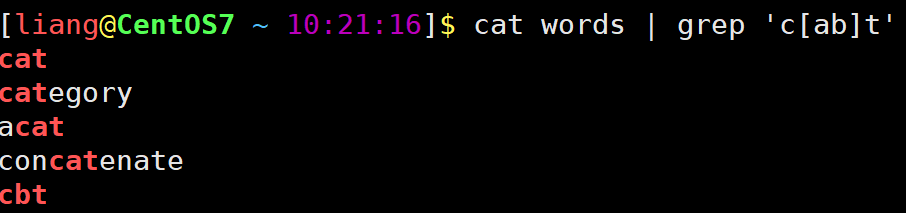 [a-z] [A-Z] [0-9] [a-z]匹配所有小写字母。 [A-Z]匹配所有大写字母。 [0-9]匹配所有数字。 bath [liangCentOS7 ~ 10:21:48]$ cat words | grep c[a-z]t cat category acat concatenate cbt[liangCentOS7 ~ 10:22:01]$ cat words | grep c[A-Z]t cCt[liangCentOS7 ~ 10:22:14]$ cat words | grep c[0-9]t c1t[liangCentOS7 ~ 10:22:29]$ cat words | grep c[a-z0-9]t cat category acat concatenate cbt c1t[liangCentOS7 ~ 10:22:38]$ cat words | grep c[a-zA-Z0-9]t cat category acat concatenate cbt c1t cCt要想匹配-符号将改符号写在第一个位置[^…]匹配除了 […] 中字符的所有字符。[liangCentOS7 ~ 10:23:21]$ cat words | grep c[^ab]t c1t cCt c-t c.t^放中间会被当做普通字符liangCentOS7 ~ 10:23:42]$ cat words | grep ‘c[a^b]t’catcategoryacatconcatenatecbt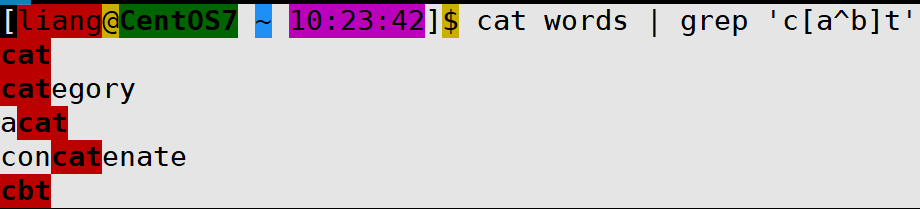 ### \ 将下一个字符标记为或特殊字符、或原义字符、或向后引用、或八进制转义符。 例如 n 匹配字符 n。\n 匹配换行符。序列 \\ 匹配 \而 \( 则匹配 )。 bath [liangCentOS7 ~ 10:24:01]$ cat words | grep c\.t c.t匹配普通字符虽然可以匹配但强烈建议不要在前面加\[liangCentOS7 ~ 10:24:16]$ cat words | grep c\at cat category acat concatenate| 符号是扩展表达式中元字符指明两项之间的一个选择。要匹配 |请使用 |# 使用egrep或者grep -E 匹配 [liangCentOS7 ~ 10:24:45]$ cat words | egrep cat|dog cat category acat concatenate dog #或者 [liangCentOS7 ~ 10:24:55]$ cat words | egrep -E cat|dog cat category acat concatenate dog字符集总结非打印字符终端中不显示的字符例如换行符。grep 命令支持\w、\W、\s、\S。定位符^匹配行首位置。$匹配行末位置。查看 /var/log/message Aug 19 14:01 到 Aug 19 14:06 时间段发生的事件只包含cat的行排除/etc/profile文件中以#开头的行[liangCentOS7 ~ 18:14:48]$ cat /etc/profile | egrep ^[^#] pathmunge () { case :${PATH}: in *:$1:*) ;; *) if [ $2 after ] ; then PATH$PATH:$1 else PATH$1:$PATH fi esac } if [ -x /usr/bin/id ]; then if [ -z $EUID ]; then # ksh workaround EUID/usr/bin/id -u UID/usr/bin/id -ru fi USER/usr/bin/id -un LOGNAME$USER MAIL/var/spool/mail/$USER .....查询/etc/profile文件中有效行[liangCentOS7 ~ 18:40:26]$ cat /etc/profile | egrep -v ^#|^$ # -v 取反不显示匹配的内容查看系统中有哪些仓库\b匹配一个单词边界。\B基本不用非单词边界匹配。 和 基本不用 匹配一个单词左边界。匹配一个单词右边界。限定次数匹配前面的子表达式任意次数。是扩展表达式元字符匹配前面的子表达式一次以上次数。?? 是扩展表达式元字符匹配前面的子表达式一次以下次数。{n}{} 是扩展表达式元字符用于匹配特定次数。例如{n}配置n次。{m,n}{m,n}是扩展表达式元字符用于匹配次数介于m-n之间。{m,}{m,}是扩展表达式元字符匹配前面的子表达式m次以上次数。{,n}{,n}是扩展表达式元字符匹配前面的子表达式n次以下次数。()标记一个子表达式综合案例如何过滤出以下内容中所有有效IPv4地址0.0.0.0 1.1.1.1 11.11.11.111 111.111.111.111 999.9.9.9 01.1.1.1 10.0.0.0 0.1.1.1 266.1.1.1 248.1.1.1 256.1.1.1参考答案# 第一个位 [1-9][0-9]? # 1-99 1[0-9]{2} # 100-199 2[0-4][0-9] # 200-249 25[0-5] # 250-255 # 第二位 [1-9]?[0-9] # 0-99 1[0-9]{2} # 100-199 2[0-4][0-9] # 200-249 25[0-5] # 250-255 # 最终代码 \b(([1-9]?[0-9])|(1[0-9]{2})|(2[0-4][0-9])|(25[0-5]))(\.(([1-9]?[0-9])|(1[0-9]{2})|(2[0-4][0-9])|(25[0-5]))){3}\b其他工具使用案例vim搜索和替换。less搜索。三剑客grep过滤sed修改awk格式化输出grepgrep 介绍grep 是 Linux 系统中最重要的命令之一其功能是从文本文件或管道数据流中筛选匹配的行及数据grep 命令语法过滤管道command | grep [OPTION]… PATTERNS过滤文件grep [OPTION]… PATTERNS [FILE]…grep 命令帮助信息如下例[laomashell bin]$ grep --help Usage: grep [OPTION]... PATTERNS [FILE]... Search for PATTERNS in each FILE. Example: grep -i hello world menu.h main.c PATTERNS can contain multiple patterns separated by newlines. Pattern selection and interpretation: -E, --extended-regexp PATTERNS are extended regular expressions -F, --fixed-strings PATTERNS are strings -G, --basic-regexp PATTERNS are basic regular expressions -P, --perl-regexp PATTERNS are Perl regular expressions -e, --regexpPATTERNS use PATTERNS for matching -f, --fileFILE take PATTERNS from FILE -i, --ignore-case ignore case distinctions in patterns and data --no-ignore-case do not ignore case distinctions (default) -w, --word-regexp match only whole words -x, --line-regexp match only whole lines -z, --null-data a data line ends in 0 byte, not newline Miscellaneous: -s, --no-messages suppress error messages -v, --invert-match select non-matching lines -V, --version display version information and exit --help display this help text and exit Output control: -m, --max-countNUM stop after NUM selected lines -b, --byte-offset print the byte offset with output lines -n, --line-number print line number with output lines --line-buffered flush output on every line -H, --with-filename print file name with output lines -h, --no-filename suppress the file name prefix on output --labelLABEL use LABEL as the standard input file name prefix -o, --only-matching show only nonempty parts of lines that match -q, --quiet, --silent suppress all normal output --binary-filesTYPE assume that binary files are TYPE; TYPE is binary, text, or without-match -a, --text equivalent to --binary-filestext -I equivalent to --binary-fileswithout-match -d, --directoriesACTION how to handle directories; ACTION is read, recurse, or skip -D, --devicesACTION how to handle devices, FIFOs and sockets; ACTION is read or skip -r, --recursive like --directoriesrecurse -R, --dereference-recursive likewise, but follow all symlinks --includeGLOB search only files that match GLOB (a file pattern) --excludeGLOB skip files that match GLOB --exclude-fromFILE skip files that match any file pattern from FILE --exclude-dirGLOB skip directories that match GLOB -L, --files-without-match print only names of FILEs with no selected lines -l, --files-with-matches print only names of FILEs with selected lines -c, --count print only a count of selected lines per FILE -T, --initial-tab make tabs line up (if needed) -Z, --null print 0 byte after FILE name Context control: -B, --before-contextNUM print NUM lines of leading context -A, --after-contextNUM print NUM lines of trailing context -C, --contextNUM print NUM lines of output context -NUM same as --contextNUM --group-separatorSEP use SEP as a group separator --no-group-separator use empty string as a group separator --color[WHEN], --colour[WHEN] use markers to highlight the matching strings; WHEN is always, never, or auto -U, --binary do not strip CR characters at EOL (MSDOS/Windows) When FILE is -, read standard input. With no FILE, read . if recursive, - otherwise. With fewer than two FILEs, assume -h. Exit status is 0 if any line is selected, 1 otherwise; if any error occurs and -q is not given, the exit status is 2. Report bugs to: bug-grepgnu.org GNU grep home page: http://www.gnu.org/software/grep/ General help using GNU software: https://www.gnu.org/gethelp/文件准备[liangCentOS7 ~ 14:33:15]$ vim words cat category acat concatenate cbt c1t cCt c-t c.t dog模式选择和解释选项-E 选项支持扩展正则表达式相当于 egrep 命令。[liangCentOS7 ~ 15:03:21]$ cat words | grep -E (dog){3} dogdogdog dogdogdogdog #或者 [liangCentOS7 ~ 15:04:04]$ cat words | egrep (dog){3} dogdogdog dogdogdogdog-e 选项使用多个 -e 选项匹配多个PATTERNS。[liangCentOS7 ~ 15:04:22]$ cat words | grep -e cat -e dog cat category acat concatenate dog hello cat kitty dogdog dogdogdog dogdogdogdog #或者 [liangCentOS7 ~ 15:05:00]$ cat words | egrep cat|dog cat category acat concatenate dog hello cat kitty dogdog dogdogdog dogdogdogdog-f 选项从文件读取多个 PATTERNS。-i 选项忽略大小写匹配。-w 选项匹配整个单词。[liangCentOS7 ~ 15:07:06]$ cat words | grep -w cat cat hello cat kitty #或者 [liangCentOS7 ~ 15:07:17]$ cat words | grep \bcat\b cat hello cat kitty-x 选项匹配整行。[liangCentOS7 ~ 15:07:40]$ cat words | grep -x cat cat #或者 [liangCentOS7 ~ 15:08:10]$ cat words | grep ^cat$ cat查找文件选项-r -R 选项超级重要-r递归匹配目录。-R递归匹配目录跟随软链接。补充centos系统查找文件工具find和locate由mlocate包提供[liangCentOS7 ~ 16:03:06]$ find /etc -name pass* find: ‘/etc/grub.d’: Permission denied find: ‘/etc/pki/CA/private’: Permission denied find: ‘/etc/pki/rsyslog’: Permission denied find: ‘/etc/lvm/archive’: Permission denied find: ‘/etc/lvm/backup’: Permission denied find: ‘/etc/lvm/cache’: Permission denied /etc/passwd- /etc/passwd find: ‘/etc/polkit-1/rules.d’: Permission denied find: ‘/etc/polkit-1/localauthority’: Permission denied find: ‘/etc/dhcp’: Permission denied /etc/openldap/certs/password find: ‘/etc/selinux/targeted/active’: Permission denied find: ‘/etc/selinux/final’: Permission denied /etc/pam.d/passwd /etc/pam.d/password-auth-ac /etc/pam.d/password-auth find: ‘/etc/firewalld’: Permission denied find: ‘/etc/audisp’: Permission denied find: ‘/etc/audit’: Permission denied find: ‘/etc/sudoers.d’: Permission denied # 先更新locate数据然后再查找 [liangCentOS7 ~ 16:04:23]$ sudo updatedb [liangCentOS7 ~ 16:04:59]$ locate pass |grep ^/etc /etc/passwd /etc/passwd- /etc/openldap/certs/password /etc/pam.d/passwd /etc/pam.d/password-auth /etc/pam.d/password-auth-ac /etc/security/opasswd .....-h 和 -H 选项-h不显示匹配项目所在文件的文件名。-H显示匹配项目所在文件的文件名默认情况使用该选项。sedsed 介绍sed英文全称 stream editor 是一种非交互式的流编辑器能够实现对文本非交互式的处理功能很强大。sed 是一个 70 后诞生于 1973 - 1974 年间具体时间未知。而出生地则是鼎鼎大名的 贝尔实验室。sed 是 麦克马洪 McMahon 老爷子在 贝尔实验室 时开发出来的。sed 的诞生使并不是那么的神秘它的诞生只不过是 麦克马洪 McMahon 老爷子想写一个 行编辑器谁知写着写着就写成了 sed 的样子。其实在 sed 之前还有一个更古老的行编辑器名字叫做 ed 编辑器。大概是 麦克马洪 McMahon 老爷子觉得 ed 编辑器不好用吧顺手重新构架和编写。sed 工作流程读取行 - 执行 - 显示 - 读取行 - 执行 - 显示 - … - 读取行 - 执行 - 显示读取行sed 从输入流 文件、管道、标准输入流中读取 一行 并存储在名叫 pattern space 的内部空间中。sed 是行文字处理器。每次只会读取一行。sed 内部会有一个计数器记录着当前已经处理多少行也就是当前行的行号。执行按照 sed 命令定义的顺序依次应用于刚刚读取的 一行 数据。默认情况下sed 一行一行的处理所有的输入数据。但如果我们指定了行号则只会处理指定的行。显示把经过 sed 命令处理的数据发送到输出流文件、管道、标准输出并同时清空 pattern space 空间。上面流程一直循环直到输入流中的数据全部处理完成。sed 注意事项整个流程看似简单有几个知识点需要注意pattern space 空间是 sed 在内存中开辟的一个私有的存储区域。内存的特性会导致关闭命令行或关机数据就没了。默认情况下sed 命令只会处理 pattern space 空间中的数据且并不会将处理后的数据保存到源文件中。也就是说sed 默认并不会修改源文件。但 GNU SED 提供提供了一种方式用于修改 源文件。方式就是传递 -i 选项在后面的章节中介绍。sed 还在内存上开辟了另一个私有的空间 hold space 用于保存处理后的数据以供以后检索。每一个周期执行结束sed 会清空 pattern space 空间的内容但 hold space 空间的内容并不会清空。hold space 空间用于存储处理后数据sed 命令并不会对这里的数据处理。这样当 sed 需要之前处理后的数据时可以随时从 hold space 空间读取。sed 程序执行前模式 pattern 和 hold space 空间都是空的。如果我们没有传递任何输入文件sed 默认会从 标准输入 中读取数据。sed 可以指定只处理输入数据中的行范围。默认情况下是全部行因此会依次处理每一行。sed 命令语法sed 帮助[laomashell ~]$ sed --help Usage: sed [OPTION]... {script-only-if-no-other-script} [input-file]... -n, --quiet, --silent suppress automatic printing of pattern space -e script, --expressionscript add the script to the commands to be executed -f script-file, --filescript-file add the contents of script-file to the commands to be executed --follow-symlinks follow symlinks when processing in place -i[SUFFIX], --in-place[SUFFIX] edit files in place (makes backup if SUFFIX supplied) -c, --copy use copy instead of rename when shuffling files in -i mode -b, --binary does nothing; for compatibility with WIN32/CYGWIN/MSDOS/EMX ( open files in binary mode (CRLFs are not treated specially)) -l N, --line-lengthN specify the desired line-wrap length for the l command --posix disable all GNU extensions. -r, --regexp-extended use extended regular expressions in the script. -s, --separate consider files as separate rather than as a single continuous long stream. -u, --unspaceed load minimal amounts of data from the input files and flush the output spaces more often -z, --null-data separate lines by NUL characters --help display this help and exit --version output version information and exit If no -e, --expression, -f, or --file option is given, then the first non-option argument is taken as the sed script to interpret. All remaining arguments are names of input files; if no input files are specified, then the standard input is read. GNU sed home page: http://www.gnu.org/software/sed/. General help using GNU software: http://www.gnu.org/gethelp/. E-mail bug reports to: bug-sedgnu.org. Be sure to include the word sed somewhere in the Subject: field. 注释 -n, --quiet, --silent 取消自动打印模式空间 -e 脚本, --expression脚本 添加“脚本”到程序的运行列表 -f 脚本文件, --file脚本文件 添加“脚本文件”到程序的运行列表 --follow-symlinks 直接修改文件时跟随软链接 -i[扩展名], --in-place[扩展名] 直接修改文件(如果指定扩展名就备份文件) -l N, --line-lengthN 指定“l”命令的换行期望长度 --posix 关闭所有 GNU 扩展 -r, --regexp-extended 在脚本中使用扩展正则表达式 -s, --separate 将输入文件视为各个独立的文件而不是一个长的连续输入 -u, --unspaceed 从输入文件读取最少的数据更频繁的刷新输出 --help 打印帮助并退出 --version 输出版本信息并退出 -a ∶新增 a 的后面可以接字串而这些字串会在新的一行出现(目前的下一行) -c ∶取代 c 的后面可以接字串这些字串可以取代 n1,n2 之间的行 -d ∶删除因为是删除啊所以 d 后面通常不接任何咚咚 -i ∶插入 i 的后面可以接字串而这些字串会在新的一行出现(目前的上一行) -p ∶列印亦即将某个选择的资料印出。通常 p 会与参数 sed -n 一起运作 -s ∶取代可以直接进行取代的工作哩通常这个 s 的动作可以搭配正规表示法sed 命令语法简写格式如下:sed [option] [sed-command] [input-file]总的来说 sed 命令主要由四部分构成:sed 命令。[option] 命令行选项用于改变 sed 的工作流程。[sed-command] 是具体的 sed 命令。[input-file] 输入数据如果不指定则默认从标准输入中读取。示例1模拟cat命令打印文件内容[liangCentOS7 ~ 19:37:57]$ cat data.txt EOF I am studing sed I am www.laoma.cloud I am a Superman I am so handsome EOF [liangCentOS7 ~ 19:38:36]$ [liangCentOS7 ~ 19:38:36]$ [laomashell ~]$ sed data.txt -bash: [laomashell: command not found [liangCentOS7 ~ 19:38:36]$ I am studing sed -bash: I: command not found [liangCentOS7 ~ 19:38:36]$ I am www.laoma.cloud -bash: I: command not found [liangCentOS7 ~ 19:38:36]$ I am a Superman -bash: I: command not found [liangCentOS7 ~ 19:38:36]$ I am so handsome对照着 sed 命令的语法格式这里未使用 option。‘’ 对应着 [sed-command] 为具体的 sed 语句。data.txt 对应着 [input-file]用于提供输入数据。示例2从标准输入中读取数据如果我们没有提供输入文件那么 sed 默认会冲标准输入中读取数据。[liangCentOS7 ~ 19:43:21]$ sed ## 输入hello world并回车 hello world ## 输出hello world hello world ## 按ctrld推出-n 选项重要如果指定了该选项那么模式空间数据将不会自动打印需要明确指明打印才会输出记录。## 以下命令没有任何输出 [liangCentOS7 ~ 19:44:07]$ sed -n data.txt ## 打印第一行记录 [liangCentOS7 ~ 19:44:42]$ sed -n 1p data.txt I am studing sed插入(重要)a(append) 在匹配行下面插入新行[liangCentOS7 ~ 19:55:25]$ sed /root/aaaaa test root:x:0:0:root:/root:/bin/bash aaaa bin:x:1:1:bin:/bin:/bin/false daemon:x:2:2:daemon:/sbin:/bin/false mail:x:8:12:mail:/var/spool/mail:/bin/false ftp:x:14:11:ftp:/home/ftp:/bin/false nobody:$:99:99:nobody:/:/bin/false zhangy:x:1000:100:,,,:/home/zhangy:/bin/bash http:x:33:33::/srv/http:/bin/false dbus:x:81:81:System message bus:/:/bin/false hal:x:82:82:HAL daemon:/:/bin/false ....i(insert) 在匹配行上面插入新行[liangCentOS7 ~ 19:55:48]$ sed /root/iiiii test iiii root:x:0:0:root:/root:/bin/bash bin:x:1:1:bin:/bin:/bin/false daemon:x:2:2:daemon:/sbin:/bin/false mail:x:8:12:mail:/var/spool/mail:/bin/false ftp:x:14:11:ftp:/home/ftp:/bin/false ....思考是否可以使用 s 命令实现插入1 在匹配行下面插入新行[liangCentOS7 ~ 19:56:54]$ sed -nr s/^root(.*)/root\1\naaaa/p test root:x:0:0:root:/root:/bin/bash aaaa2 在匹配行上面插入新行[liangCentOS7 ~ 20:04:06]$ sed -nr s/^root(.*)/iiii\nroot\1/p test iiii root:x:0:0:root:/root:/bin/bash3 在匹配行首插入字符串[liangCentOS7 ~ 20:03:53]$ sed -nr s/^root/haharoot/p test haharoot:x:0:0:root:/root:/bin/bash4 在匹配行尾插入字符串[liangCentOS7 ~ 20:04:06]$ sed -nr s/^root(.*)/iiii\nroot\1/p test iiii root:x:0:0:root:/root:/bin/bash5 在特定字符串前插入字符串[liangCentOS7 ~ 20:04:40]$ sed -nr s/root/laoma-root/gp test laoma-root:x:0:0:laoma-root:/laoma-root:/bin/bash6 在特定字符串后插入字符串[liangCentOS7 ~ 20:06:00]$ sed -nr s/root/root-laoma/gp test root-laoma:x:0:0:root-laoma:/root-laoma:/bin/bash删除重要作用d删除模式空间所有记录。D删除模式空间第一行记录。语法d 格式[address1[,address2]]dD 格式[address1[,address2]]Daddress1 和 address2 分别是 起始地址 和 结束地址可以是 行号或 模式字符串。address1 和 address2 都是可选参数可以都不填这时候就是删除所有行从文件的开头到文件结束。如果存在一个那么就是删除 单行。也就是只删除 address1 指定的那行。d 命令仅从 模式缓冲区 中删除行也就是该行不会发送到输出流原始文件保持不变。d 删除 示例示例1 删除1-14行[liangCentOS7 ~ 20:06:41]$ sed -e 1,14d test zhangying:*:1004:1004::/home/test:/bin/bash policykit:x:102:1005:Po示例2 删除4以后的行包括第4行把$当成最大行数就行了。[liangCentOS7 ~ 20:07:52]$ sed -e 4,$d test root:x:0:0:root:/root:/bin/bash bin:x:1:1:bin:/bin:/bin/false daemon:x:2:2:daemon:/sbin:/bin/false示例3 删除包括false的行或者包括bash的行别忘了加\[liangCentOS7 ~ 20:08:23]$ sed -re /(false|bash)/d test policykit:x:102:1005:Po示例4 删除从匹配root的行到匹配以test开头的行中间的行[liangCentOS7 ~ 20:09:09]$ sed -e /root/,/^test/d test zhangying:*:1004:1004::/home/test:/bin/bash policykit:x:102:1005:Po思考是否使用使用 s 命令实现删除1 删除特定行[liangCentOS7 ~ 20:10:33]$ sed -r s/.*root.*$//;/^$/d test bin:x:1:1:bin:/bin:/bin/false daemon:x:2:2:daemon:/sbin:/bin/false mail:x:8:12:mail:/var/spool/mail:/bin/false ftp:x:14:11:ftp:/home/ftp:/bin/false nobody:$:99:99:nobody:/:/bin/false zhangy:x:1000:100:,,,:/home/zhangy:/bin/bash http:x:33:33::/srv/http:/bin/false dbus:x:81:81:System message bus:/:/bin/false hal:x:82:82:HAL daemon:/:/bin/false mysql:x:89:89::/var/lib/mysql:/bin/false aaa:x:1001:1001::/home/aaa:/bin/bash ba:x:1002:1002::/home/zhangy:/bin/bash test:x:1003:1003::/home/test:/bin/bash zhangying:*:1004:1004::/home/test:/bin/bash policykit:x:102:1005:Po2 删除特定字符串[liangCentOS7 ~ 20:12:30]$ sed -nr s/^root//gp test :x:0:0:root:/root:/bin/bashD 删除 示例删除当前模式空间开端至\n的内容放弃之后的命令对剩余模式空间继续执行sed。示例1读取最后一行内容[liangCentOS7 ~ 20:12:45]$ echo This is 1 This is 2 This is 3 This is 4 This is 5 | sed N;D This is 5 [liangCentOS7 ~ 20:14:03]$ ## 输出内容 [liangCentOS7 ~ 20:14:03]$ This is 5说明读取This is 1执行N得出This is 1\nThis is 2\n执行D。读取This is 3执行N得出This is 3\nThis is 4\n执行D。读取This is 5执行N后续无内容读取失败放弃后续命令正常打印This is 5示例2删除偶数行[liangCentOS7 ~ 20:15:53]$ echo This is 1 This is 2 This is 3 This is 4 This is 5 | sed n;D This is 1 This is 3 This is 5说明读取This is 1执行nThis is 2\n覆盖This is 1\n执行D删除This is 2\nThis is 1\n没有删除正常打印This is 1。读取This is 3执行nThis is 4\n覆盖This is 3\n执行D删除This is 4\n正常打印This is 3。读取This is 5执行n后续无内容读取失败放弃后续命令正常打印This is 5
)
)
)
通信与速度测试)


 张开发
张开发 


:大语言模型交互范式的统一框架与实证研究)


